
Table of Contents
- Why Ambient Temperature Matters for 3D Printing
- Ideal Room Temperature for 3D Printing
- How Cold Environments Affect Print Quality
- How Hot Environments Affect Print Quality
- 3D Print Warping: Causes and Fixes
- Using a 3D Printer Enclosure to Control Temperature
- Ambient Temperature for PLA Printing: Material-Specific Guidance
- Measuring and Controlling Your Print Environment
- Frequently Asked Questions
Last Updated: October 19, 2026
Why Ambient Temperature Matters for 3D Printing
The success of your 3D print depends on more than just your machine and filament. Ambient temperature 3D printing is one of the most overlooked factors that separates quality prints from failed ones. Temperature affects how plastic flows, how layers bond, and whether your finished piece stays strong or cracks apart.
We’ve seen countless projects fail because makers didn’t control their print environment. The good news: understanding temperature is straightforward once you know what to watch for.
Temperature influences every stage of the printing process. It changes how your filament behaves as it exits the nozzle. It affects how plastic cools and hardens between layers. It determines whether your print sticks to the bed or peels away mid-job.
The real challenge isn’t learning about temperature, it’s controlling it consistently. Most home printers sit in living spaces where temperature fluctuates throughout the day and season. That inconsistency compounds over hours of printing, leading to warping, weak layers, and dimensional inaccuracy.
Ideal Room Temperature for 3D Printing
The best room temperature for 3D printing falls between 68°F and 75°F for most FDM printing projects. This range keeps your filament stable and gives your nozzle consistent material to work with.
Why this range? At temperatures below 65°F, plastic becomes brittle. It cools too fast between layers, creating weak bonds. Your print may look fine but snap under light pressure.
Above 80°F, the opposite happens. Plastic stays soft longer. Your layers don’t harden properly, and the print loses dimensional accuracy. Walls may sag slightly. Fine details blur.
Temperature stability matters more than hitting one exact number. A room that stays at 70°F consistently outperforms a room that swings between 65°F and 78°F.
Here’s what you should track:
- Check the room temperature before you start printing
- Measure again halfway through your print job
- Record the ambient conditions (time of day, season, weather)
- Note any changes in print quality alongside temperature data
This simple log reveals patterns. You’ll spot whether your prints fail during specific seasons or times of day, a sign that temperature is the culprit.
How Cold Environments Affect Print Quality
When your room temperature drops below 65°F, plastic cools faster than it should. This creates several visible problems.
First-layer adhesion fails. The bed temperature stays constant, but the ambient air cools the plastic so quickly that it contracts before bonding to the bed. You’ll see corners lift or the entire first layer peel away as printing continues.
Layer adhesion weakens. Each new layer should fuse slightly with the layer below it. In cold rooms, layers cool and harden before the next layer arrives. They stack like playing cards instead of bonding like glue. Your finished print feels grainy and breaks easily.
Filament becomes brittle. Cold plastic is less flexible. It snaps rather than bends. A print that should flex slightly under pressure will crack instead.
Dimensional accuracy suffers. Plastic shrinks as it cools. In a cold room, this happens unevenly across your print. One side may shrink more than another, creating warping or parts that don’t fit together.
Common symptoms of cold-environment printing:
- Print corners lifting during the job
- Layers separating when you touch the finished print
- Prints that snap or crack under normal use
- Holes and slots that are slightly too tight or too loose
- Rough, grainy texture on the surface
If you see these signs, your room is probably too cold. Raise the ambient temperature by just 5°F and try again. You’ll often see immediate improvement.
How Hot Environments Affect Print Quality
When your room temperature exceeds 80°F, plastic stays soft too long. This creates a different set of problems.
Nozzle temperature control becomes unreliable. Your printer aims for a specific nozzle temperature, but if the ambient air is hot, the nozzle stays hotter longer. The plastic flowing through it softens more than intended.
Thermal stability is lost. Heat creep occurs when warmth travels up the extruder and softens filament before it reaches the hot end. The filament jams or extrudes inconsistently.
Layer adhesion is too strong. This sounds good, but it’s not. Layers fuse so well that they don’t cool properly between passes. The print loses fine details and walls may sag slightly.
Warping happens differently. In cold rooms, prints warp as they cool. In hot rooms, prints warp as they try to cool down while surrounded by warm air. The top of the print cools faster than the bottom, creating internal stress.
Dimensional accuracy decreases. The print expands slightly while still warm. It shrinks as it cools. In a hot room, this happens slowly and unevenly, leading to parts that are slightly larger or smaller than your design intended.
Watch for these signs in hot environments:
- Nozzle clogs or filament jamming mid-print
- Over-extrusion (walls too thick, details filled in)
- Sagging or drooping on tall prints
- Layers that are too fused together (hard to separate)
- Finished prints that are slightly larger than expected
If your room is above 80°F, cool it down. Even a small drop makes a difference.
3D Print Warping: Causes and Fixes
Warping is the most visible sign that temperature is causing problems. Your print curves, twists, or lifts at the edges. It looks nothing like your design.
What causes warping:
Plastic shrinks as it cools. Different parts of your print cool at different rates. The edges cool faster than the center.
Warping happens most on large, flat prints and prints with thick walls. Small prints with thin walls warp less because they cool more evenly.
How ambient temperature triggers warping:
In a cold room, the plastic cools so fast that shrinkage happens all at once. The stress builds quickly and the print warps dramatically.
In a hot room, the plastic cools slowly. The stress builds gradually.
Fixes for warping:
Stabilize your ambient temperature first. This solves 70% of warping issues immediately.
Next, improve bed adhesion. A print that sticks firmly to the bed can’t lift and warp.
Consider an enclosure. A simple box around your printer traps heat and stabilizes the ambient temperature around the machine. This is one of the most effective fixes.
Adjust your nozzle temperature slightly. For PLA, try 200-210°C. For ABS, try 230-240°C. The exact temperature depends on your specific filament and printer.
Print slower. Slower printing gives layers more time to bond before cooling. This reduces stress.
Using a 3D Printer Enclosure to Control Temperature
An enclosure is a box or cabinet that surrounds your printer. It traps heat and stabilizes the ambient temperature around the machine.
Why enclosures work:
Your printer generates heat. The hot end, heated bed, and moving parts all produce warmth.
This warmth is consistent. It doesn’t fluctuate with the seasons or time of day. Your printer always works in a stable thermal environment.
Types of enclosures:
Simple cardboard box: Free or nearly free. Tape a box around your printer. Cut holes for cooling fans. This works surprisingly well for casual printing.
Plastic storage container: Inexpensive. Clear plastic lets you watch your print. Drill holes for ventilation and cable management.
Custom wooden enclosure: More expensive but durable. You control the design. Insulation can be added for better temperature stability.
Commercial enclosure: Designed specifically for 3D printers. Often include temperature monitoring and ventilation systems. Higher cost but purpose-built.
Important: Ventilation matters. Your printer needs airflow to prevent overheating. Don’t seal it completely. Drill or cut vents at the top. Use small fans to circulate air.
Temperature monitoring inside an enclosure:
Place a thermometer inside your enclosure. Check it regularly. The internal temperature should be 5-15°F warmer than your room. If it’s much warmer, increase ventilation.
Most enclosures stabilize temperature within 2-3°C. This consistency alone improves print quality dramatically.
Ambient Temperature for PLA Printing: Material-Specific Guidance
PLA is the most beginner-friendly filament. It’s forgiving in many ways, but temperature still matters.
PLA prints best between 68°F and 75°F ambient temperature. This is slightly cooler than ABS or PETG because PLA is less heat-sensitive.
Why PLA is different:
PLA has a lower glass transition temperature than other plastics. This means it softens at a lower temperature. In a hot room, PLA loses shape more easily. In a cold room, PLA becomes brittle faster.
Nozzle temperature for PLA:
PLA typically extrudes at 200-210°C. The exact temperature depends on your filament brand. Check the manufacturer’s recommendation on the spool or packaging.
If your ambient temperature is on the cool side (65-68°F), use the higher end: 210°C. This helps the plastic flow smoothly.
If your ambient temperature is on the warm side (72-75°F), use the lower end: 200°C. This prevents over-extrusion.
Bed temperature for PLA:
PLA sticks well to a bed heated to 50-60°C. Some people use 40°C. The lower bed temperature reduces warping risk.
Again, ambient temperature matters. In a cold room, use 60°C. In a warm room, use 50°C.
First-layer speed with PLA:
Slow down your first layer. Use 50% of your normal print speed. This gives the plastic time to bond to the bed before cooling completely.
Once the first layer is done, you can speed up.
Common PLA issues tied to ambient temperature:
- Weak layers in cold rooms: Raise ambient temperature or use a higher nozzle temperature
- Sagging walls in hot rooms: Lower ambient temperature or reduce nozzle temperature
- Warping corners: Stabilize ambient temperature and use an enclosure
- First-layer adhesion problems: Check both ambient temperature and bed temperature
Measuring and Controlling Your Print Environment
You can’t control what you don’t measure. Start by tracking your ambient temperature consistently.
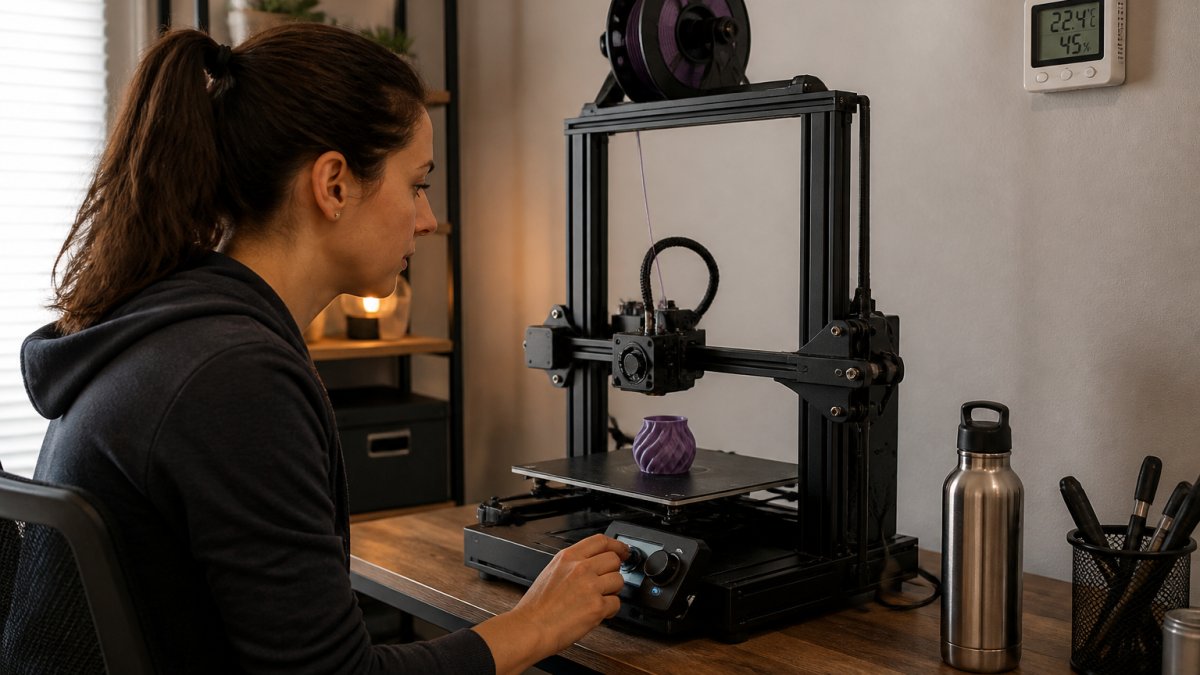
Tools you need:
A simple digital thermometer costs under $15.
A hygrometer measures humidity. Humidity affects filament behavior too, but temperature is the priority.
Steps to establish baseline conditions:
Record your room temperature for one week. Note the time of day, season, and weather. This reveals patterns.
Print the same test object every day for one week without changing settings. Note any differences in quality.
You’ll quickly see whether temperature is your limiting factor.
Controlling ambient temperature:
If your room is too cold, use a space heater. Set it to maintain 70-72°F.
If your room is too hot, use air conditioning or a fan.
Avoid direct sunlight on your printer. Sunlight heats the machine unevenly.
Keep your printer away from windows, doors, and vents. These create drafts and temperature swings.
Using an enclosure to stabilize temperature:
An enclosure reduces your workload.
Monitor the temperature inside your enclosure. Aim for 70-75°F. Adjust ventilation if needed.
An enclosure also protects your prints from drafts, dust, and curious hands. It’s worth the effort.
Tracking results over time:
Keep a simple log:
| Date | Room Temp | Print Type | Result | Notes |
|---|---|---|---|---|
| Oct 15 | 68°F | PLA test cube | Good adhesion, no warping | Consistent temperature |
| Oct 16 | 72°F | PLA test cube | Slight over-extrusion | Room warmed up |
| Oct 17 | 65°F | PLA test cube | Corner lift | Cold morning, room cooled |
After two weeks, patterns emerge. You’ll know exactly what temperature range works best for your setup.
Understanding your print environment transforms your results. Temperature control isn’t complicated, it’s just consistent attention to one variable.
Frequently Asked Questions
What is the ideal room temperature for 3D printing?
Most FDM printers perform best between 68-75°F (20-24°C). PLA prints reliably at room temperature but benefits from stable conditions around 70°F (21°C). ABS and ASA require warmer environments, ideally 75-80°F (24-27°C), to minimize warping. Resin printing works best between 68-77°F (20-25°C). The key is consistency, temperature fluctuations cause more problems than a steady temperature slightly outside the ideal range.
How does ambient temperature affect PLA printing?
PLA is sensitive to temperature gradients during cooling. In cold rooms (below 60°F/15°C), the material cools too quickly, causing layer adhesion problems and brittleness. In hot environments (above 80°F/27°C), PLA softens during printing, leading to drooping and poor dimensional accuracy. Ambient temperature for PLA printing works best when stable and moderate, rapid temperature swings cause more failures than steady conditions outside the ideal range.
Can a cold room cause 3D prints to warp?
Yes, cold environments trigger warping differently than heat does. In cold rooms, the print cools unevenly, with outer layers contracting faster than inner material. This creates internal stress that pulls corners up (bed adhesion failure) or causes layer separation. Additionally, cold ambient temperature reduces the nozzle’s ability to fuse layers properly, weakening mechanical strength. Enclosures or space heaters help stabilize temperature and reduce these cold-induced failures.
Should I use a 3D printer enclosure to control temperature?
An enclosure is valuable if your ambient temperature fluctuates or falls below 65°F (18°C). A 3D printer enclosure temperature control system traps radiant heat from the heated bed and nozzle, creating a stable microclimate inside. This is especially important for ABS, ASA, and nylon, which warp badly in cold or variable conditions. For PLA in a climate-controlled room, an enclosure is optional but helpful if you experience drafts or temperature swings throughout the day.



0 Comments