
Last Updated: November 26, 2026
Quick Summary
Temperature monitoring tracks hotend, bed, chamber, and ambient conditions during a print so you can catch drift before it ruins a part. Match the tool to the job: printer telemetry for what the machine controls, and separate sensors for chamber, ambient, and surface conditions it cannot see.
- Standalone thermometers and hygrometers typically cost roughly $15-$40 for filament storage and room conditions.
- Infrared thermometers read low on shiny surfaces because of emissivity and average over a spot size that grows with distance.
- OctoPrint is free host software that adds remote alerts and data logging, with roughly $35-$70 for a Raspberry Pi-class board.
- Verify sensors against an ice-water bath at 32 °F and boiling water at 212 °F at sea level.
- Enclosed printers running ABS or large parts should prioritize a dedicated chamber sensor.
Table of Contents
- Why 3D Printer Temperature Monitoring Tools Decide Print Quality
- Temperature Monitoring Tool Comparison at a Glance
- Monitoring Hotend and Bed Temperatures vs Enclosure Conditions
- 3D Printer Temperature Sensor Accuracy and Calibration Limits
- Choosing an Infrared Thermometer for 3D Printer Checks
- OctoPrint Temperature Monitoring, Alerts, and Data Logging
- Picking the Right Setup for Your Printer and Workflow
- Stocking Sensors and Filament at Craft Living Artistry
- Frequently Asked Questions
Why 3D Printer Temperature Monitoring Tools Decide Print Quality
Temperature monitoring is the practice of tracking hotend, bed, chamber, and ambient conditions during a print so you can catch drift before it ruins a part.
Your printer’s built-in thermistor reports one number, and that reading can differ from the true temperature at the print. A print can fail mid-job when heat drifts. Below, we break down what each tool category actually measures, where accuracy falls apart, and which setup fits a stock printer versus an enclosed machine.
Temperature Monitoring Tool Comparison at a Glance
The right tool depends on what you need to measure, how fast you need to know, and whether you want a local display or a remote alert. Most top results cover these categories separately; here they are side by side, with the dimensions that actually drive the buying decision.
| Tool Type | What It Measures | Typical Cost | Accuracy & Response | Connectivity / Alerts | Best For |
|---|---|---|---|---|---|
| Standalone thermometer/hygrometer | Ambient temp and humidity | Low (roughly $15-$40) | Modest absolute accuracy; slow response (minutes) | Local display; some models log to an app | Filament storage, room conditions |
| Infrared thermometer | Surface temps, non-contact | Low to mid (roughly $20-$80) | Emissivity- and spot-size-dependent; fast response | Local display; no logging on basic models | Quick bed and nozzle spot checks |
| Dedicated printer chamber sensor | Chamber temp and humidity | Mid (roughly $30-$80) | Good for trends; placement-sensitive | Local display or app; some alert | Enclosed printers, specific models |
| Host software (OctoPrint) | Hotend and bed readings, alerts | Free plus hardware (roughly $35-$70 for a Raspberry Pi-class board) | Inherits printer sensor accuracy; fast | Web dashboard, notifications, historical logging | Remote monitoring, data logging |
| Web interfaces (Mainsail, Fluidd) | Printer telemetry | Free | Inherits printer sensor accuracy; fast | Web dashboard, alerts via companion tools | Klipper-based setups |
Prices are typical U.S. street prices for hobbyist-grade gear and vary by model and seller.
The Distinction Most Comparisons Miss
Two different jobs get blurred together. Hotend and bed sensors measure printer-controlled components, the parts the firmware heats and regulates. Chamber, ambient, and IR surface tools measure conditions the printer cannot see or control. A printer can hold a perfect bed temperature while a draft cools the part from above, and no amount of staring at the printer’s display will reveal that. Match the tool to the job: printer telemetry for what the machine controls, separate sensors for what it does not.
Reading the Table by Use Case
- Open-frame printer in a shared room: a standalone thermometer and hygrometer near the filament plus an IR thermometer for spot checks covers most needs at low cost.
- Enclosed printer running ABS or large parts: a dedicated chamber sensor is the priority so you can watch heat buildup and humidity.
- Long or overnight prints: host software with notifications and logging turns a failed print into a reviewable event instead of a wasted spool.
- Multi-printer workshop: prioritize tools with historical logging so you can compare machines and spot a drifting sensor.
- Industrial or process-monitoring use: IR and contact reference tools with documented accuracy matter more than hobbyist dashboards.
The category you pick matters less than whether you actually act on the readings. A cheap thermometer that prompts you to close a window beats a fancy dashboard you never open.
Typical cost of 3D printer temperature monitoring tools
Monitoring Hotend and Bed Temperatures vs Enclosure Conditions
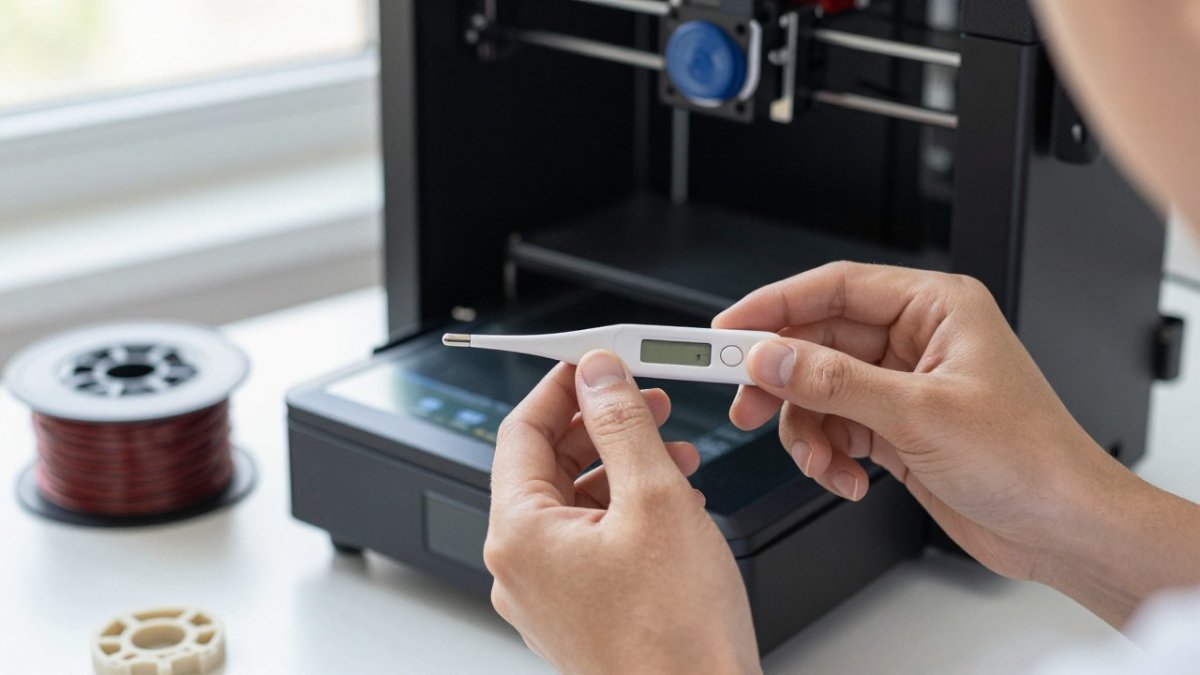
These are two different jobs, and confusing them is the most common mistake we see. Hotend and bed sensors tell you what the printer thinks its heated parts are doing. Enclosure sensors tell you what the air around the print is doing. A printer can hold a perfect bed temperature while the room drafts cool the part from above.
Hotend, Nozzle, and Build Plate Readings
The hotend and build plate are where your printer’s own sensors live. Most FDM printers use a thermistor in the hotend and another on the bed, feeding readings to the control board. These readings drive the heater, so they matter for extrusion and first-layer adhesion. The catch: they measure at the sensor, not at the nozzle tip or the print surface. A worn nozzle can throw off real extrusion temperature even when the thermistor reads normal, so it pays to know how to spot the signs of a worn 3D printer nozzle before you blame your settings.
Chamber, Ambient Temperature, and Humidity
Chamber and ambient conditions are the variables your printer cannot see. An enclosed printer holds heat, which helps large ABS parts resist warping, but the chamber can also overheat electronics. Ambient humidity matters just as much: damp filament prints with pops, stringing, and weak layer bonding. If you want the full picture of how room conditions change results, our guide on how ambient temperature affects 3D printing quality goes deeper.
3D Printer Temperature Sensor Accuracy and Calibration Limits
No consumer sensor is perfectly accurate, and knowing the limits changes how you read every number. The gap between what a sensor reports and what is actually happening at the nozzle or print surface is where most temperature-related troubleshooting goes wrong.
Where the Error Comes From
A typical FDM printer uses an NTC thermistor in the hotend and another on the bed. Thermistors are cheap, fast-responding, and reasonably repeatable, but their absolute accuracy depends on the tolerance of the part and the firmware’s temperature table.
Infrared readings add a different error class. The reading is also an average over a spot size that grows with distance, so a meter with a 12:1 distance-to-spot ratio reads a 1-inch circle from 12 inches away and a much larger area from across the room (How to Get Great Results with an Infrared Thermometer).
Response time matters too. A thermistor in a heater block responds in seconds; a chamber sensor in a plastic enclosure may lag minutes behind an actual air change. If you are watching for a draft or a door opening, a slow sensor will tell you after the part has already started to cool.
How to Verify a Reading
Calibration corrects bias, not drift, and most hobbyists never do it. A practical verification method is a reference check: bring a known reference, an ice-water bath at 32 °F (0 °C) and boiling water at 212 °F (100 °C) at sea level, and compare your sensor’s reading at those points.
Watch out: trusting a single uncalibrated reading can send you chasing the wrong fix. Our guide on how to fix warped 3D prints walks through the temperature-related causes step by step. Temperature errors and clogs also travel together, so keep our filament jam prevention guide handy when readings look strange.
Practical Limits by Tool Type
- Hotend and bed thermistors: good repeatability, modest absolute accuracy, fast response; measure at the sensor, not the nozzle tip or print surface.
- Infrared thermometers: fast and non-contact, but emissivity- and spot-size-dependent; best on matte surfaces and at close range.
- Chamber and ambient sensors: slow to respond and placement-sensitive; mount away from heaters, electronics, and direct drafts.
- Host software readings: only as accurate as the printer’s own sensors, but valuable for trends, logging, and alerts rather than absolute truth.
The takeaway is not to distrust every number but to know which number you are reading and what it can and cannot tell you.
Choosing an Infrared Thermometer for 3D Printer Checks
An infrared thermometer is a non-contact tool that reads surface temperature from a distance, and it is the fastest way to spot-check a bed or nozzle. Point it at the bed center, the corners, and the nozzle, and compare.
Two limits matter. Shiny metal surfaces read low unless the thermometer compensates for emissivity. And the reading is an average over a spot size that grows with distance, so get close. For a deeper look at how temperature drives surface defects, see our guide on fixing 3D printing layer issues.
OctoPrint Temperature Monitoring, Alerts, and Data Logging
OctoPrint is free, open-source host software that runs on a small computer and adds remote monitoring, alerts, and data logging to a compatible printer, according to the OctoPrint project. It is the most common way makers add temperature graphs and notifications without buying a new printer.
Mainsail and Fluidd are free web interfaces often paired with Klipper-based firmware. They display printer telemetry, though the specifics depend on your setup. That record is most useful when temperature readings are considered alongside the material being run, making a PLA filament review a natural next step in diagnosing inconsistent prints.
Picking the Right Setup for Your Printer and Workflow
Match the tool to the machine, not the other way around. A stock printer in an open room benefits most from an ambient thermometer and a hygrometer near the filament. An enclosed printer needs a chamber sensor so you can watch heat buildup. A maker running long prints wants software alerts so a failed print does not waste a spool overnight.
- Beginner, stock printer: start with a room thermometer and hygrometer, then add an infrared thermometer for spot checks.
- Enclosed printer: add a chamber temperature and humidity sensor matched to your model.
- Remote or overnight printing: set up OctoPrint or a Klipper web interface with alerts.
- Multi-printer workshop: prioritize data logging so you can compare machines.
Check that a sensor is compatible with your printer before you order.
Stocking Sensors and Filament at Craft Living Artistry
Good monitoring only pays off when your filament is dry and your tools are ready. At Craft Living Artistry, we offer 3D printing filaments and maker tools in one place, with a focused selection aimed at hobbyists and semi-professional makers.
Filament that jams or warps can be affected by storage conditions and heat, so pairing a hygrometer with proper storage can help. Browse our filament and tool selection to build a monitoring setup around the way you print.
Temperature drift is quiet. It rarely announces itself until a print fails hours in.
Frequently Asked Questions
How can I check whether my 3D printer’s temperature sensor is accurate?
Compare the printer’s displayed reading against a separate reference tool. Heat the hotend to a set point, let it stabilize, then take a reading with a calibrated probe or a non-contact infrared thermometer aimed at a matte target. A consistent offset of a few degrees is common and can be corrected in firmware. If readings swing wildly or drift over time, inspect the thermistor wiring and seating before trusting the number.
Can an infrared thermometer accurately measure a 3D printer hotend?
It can, with caveats. Shiny metal surfaces reflect infrared energy and skew readings, so aim at a matte point such as a dark patch of tape or the nozzle tip after it cools slightly. Emissivity settings matter, and distance-to-spot ratio determines how much area you are averaging. Use an infrared thermometer for quick spot checks and a contact probe when you need a precise number for calibration.
Can OctoPrint monitor a 3D printer’s temperature?
Yes. OctoPrint runs on a host device such as a Raspberry Pi and displays hotend and bed temperatures in its dashboard, with configurable alerts when readings fall outside a set range. Plugins add data logging and remote monitoring, so you can check a print from another room or your phone. It reads the printer’s own sensors, so accuracy still depends on the thermistor and its calibration.
Should I monitor room temperature and humidity around my 3D printer?
Yes, especially for filaments that absorb moisture. A hygrometer near the printer and filament storage shows whether humidity is climbing, which leads to popping, stringing, and weak layer adhesion. Room temperature swings also affect chamber conditions and first-layer adhesion on large prints. A combined temperature and humidity sensor, such as a dedicated unit for a specific printer model, keeps both numbers visible at a glance.





0 Comments