
Last Updated: October 24, 2026
Quick Summary
To remove 3D prints without damaging them, cool the print and build plate to room temperature first, then use a plastic scraper or flexible tool at a low 15-20 degree angle to gently slide under the print and break the bond. Apply steady, even pressure over 30-60 seconds rather than force, and match your tool and technique to your specific build plate material and filament type.
- Cool prints and build plates completely to room temperature before removal, as hot plastic is weak and flexible.
- Use a plastic scraper or flexible tool at a shallow 15-20 degree angle to distribute pressure evenly and avoid cracking prints.
- Match your tool to your build plate: plastic scrapers only on glass beds, flexible metal putty knives on metal beds, and dental floss for delicate prints.
- Apply isopropyl alcohol around stuck edges and wait 30 seconds to loosen the bond before attempting removal.
- Never use sudden force, prying, or twisting; if a print resists, change the condition by cooling further or switching techniques instead of increasing pressure.
Table of Contents
- Why Prints Stick and How to Remove 3D Prints Without Damage
- Step 1: Cool Your Print and Build Plate Before Removal
- Step 2: Choose the Right Tools for How to Remove a Stuck 3D Print
- Step 3: Use Low-Angle Scraping and Flexing Techniques
- Remove 3D Print from Glass Bed and Other Surfaces
- 3D Print Removal Tools That Protect Your Work
- 3D Print Support Removal Without Breaking Fine Details
- Common Mistakes to Avoid During Print Removal
- Frequently Asked Questions
Why Prints Stick and How to Remove 3D Prints Without Damage
When your print finishes, it’s stuck, and knowing how to remove 3D prints safely is essential. Bed adhesion makes 3D printing work, but that same bond becomes your biggest challenge at the end.
Whether you print with PLA, PETG, or resin, the principles stay the same: cool first, use the right tools, apply steady pressure, and avoid the mistakes that damage prints and plates.
Step 1: Cool Your Print and Build Plate Before Removal
The first step is also the most important: let everything cool to room temperature. Hot plastic is flexible and weak, removing a warm print is like pulling taffy.
Your build plate matters too: glass beds, flexible plates, and metal surfaces all expand when hot, so removing a print from a hot bed stresses both print and plate.
Understanding how ambient temperature affects 3D printing quality shows why this step is non-negotiable, temperature affects every stage, including removal.
Step 2: Choose the Right Tools for How to Remove a Stuck 3D Print
The tools you use determine whether your print survives intact, and whether your hands do.
The right tools are thin, flexible, and designed specifically for print removal. A plastic scraper or spatula is your first choice.
For delicate or stuck prints, dental floss or fishing line works surprisingly well, minimal pressure, real separation, though it takes patience.
Here are the tools that actually protect your work:
- Plastic scrapers or spatulas (the primary tool)
- Flexible metal putty knives (thin, not thick)
- Dental floss or fishing line (for delicate prints)
Specialized tools make the difference between success and a ruined print.
Match the Tool to the Plate and the Print
A tool that is safe on one surface is destructive on another. Decide before you pick anything up:
- Glass bed: plastic scraper only. No metal contact, ever. Glass scratches permanently and micro-cracks can spread until the bed shatters.
- PEI sheet (smooth or textured): plastic scraper first; a thin flexible metal putty knife only if you keep it nearly flat and accept the risk of scuffing the PEI. Never pry at a steep angle on PEI.
- Flexible steel sheet: the flex is your primary tool. Use a plastic scraper only for edges that resist after bending; skip metal entirely to protect the coating.
Handle Every Tool Like It Can Cut You
Scrapers, putty knives, and craft knives cause real injuries when they slip. A few habits prevent most of them:
- Point the blade away from your body. If the tool slips, it should travel away from your hands, not toward them.
- Keep your free hand behind the blade, not in front of it. Never hold the print on the side the blade is moving toward.
- Wear eye protection when using any metal blade or craft knife. Thin plastic shards and support fragments fly further than you expect.
A metal tool on a glass bed can create micro-cracks that spread over time and eventually shatter the plate. The few seconds you save are never worth the cost of a replacement bed or a cut hand.
If a print resists every tool, stop and change the condition, not the force. Re-check that the bed is fully cool, apply a little isopropyl alcohol around the edge, or switch to floss. Force is the tool that breaks prints.
Step 3: Use Low-Angle Scraping and Flexing Techniques
The angle of your scraper determines success or failure. A low angle, almost flat against the bed, distributes pressure evenly; a steep angle concentrates force on a tiny point and cracks the print.
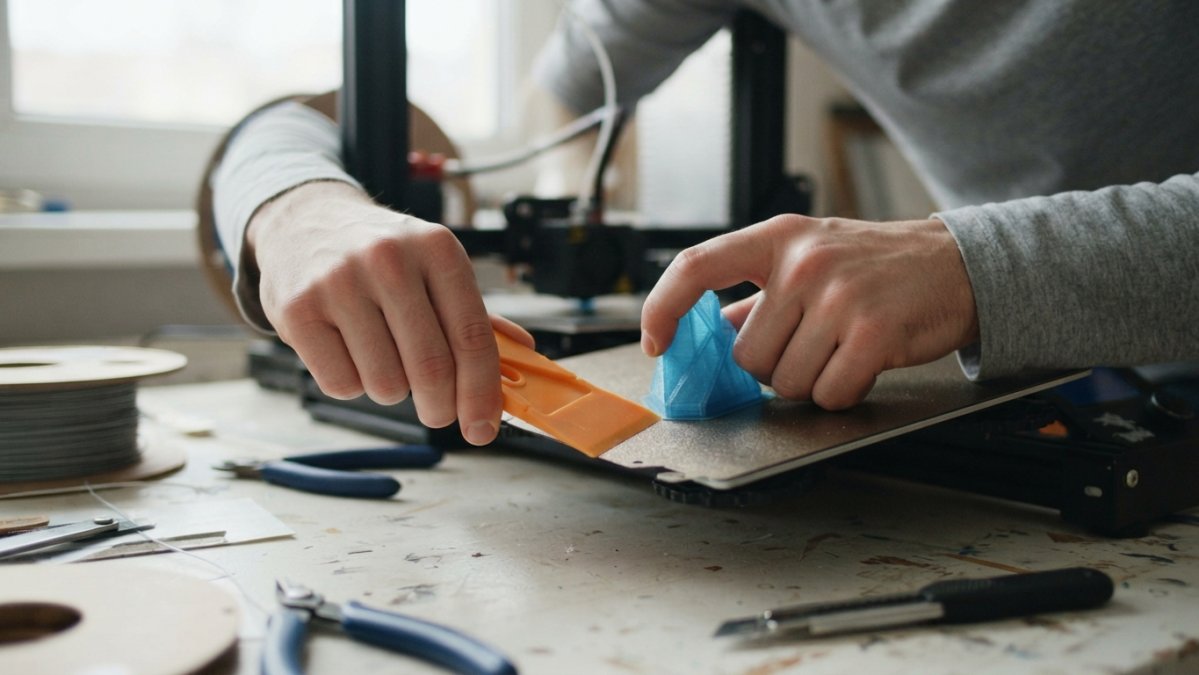
For flexible build plates, bend the plate gently while supporting the print, the flex creates separation, especially well on smaller prints.
The steps for low-angle scraping:
- Position the scraper at a 15-20 degree angle to the bed
- Slide it under the print corner, not straight down
- Apply steady pressure, not sudden force
- Work around the entire edge before lifting
- Let the print separate naturally as the bond breaks
Most stuck prints come free with steady, gentle pressure over 30-60 seconds.
Remove 3D Print from Glass Bed and Other Surfaces
Different build surfaces require different approaches, and the filament matters as much as the plate, a method that frees PLA cleanly can weld PETG to the same surface. Choose your method by plate and material together.
Decision Tree by Build Plate and Filament
Start with the plate, then adjust for the filament:
- Glass bed + PLA: cool fully, then plastic scraper at a low angle. PLA releases predictably from glass once cool. Avoid any metal contact.
- Glass bed + PETG: cool longer than you think necessary. PETG bonds aggressively to glass and can pull chips out of the surface if forced. Prefer floss or a plastic scraper worked slowly around the perimeter; never pry.
- PEI sheet + PLA: flex the sheet if removable; otherwise a plastic scraper at a shallow angle. PLA usually pops free with modest pressure.
Troubleshooting by Symptom
Generic steps fail when the print is stuck for a specific reason. Match the symptom to the fix:
- Firmly stuck, broad base: confirm the bed is at room temperature, apply isopropyl alcohol around the perimeter, wait about 30 seconds, then work a plastic scraper around the entire edge before lifting. If it still resists, switch to floss and saw gently along the bond line.
- Fragile base or thin walls: skip rigid blades. Use floss or fishing line and support the print with your free hand so it cannot flex and crack.
- Print breaking during removal: stop immediately. Breaking usually means the print is still warm, the blade angle is too steep, or force is concentrated at one point. Re-cool, lower the angle, and distribute pressure.
- One corner stuck while the rest is free: work only that corner with alcohol and a low-angle scraper. Do not lift the free side, which concentrates stress at the stuck corner and snaps it.
When Cooling, Solvents, or Force Cause Damage
Cooling, alcohol, and force are useful only within limits:
- Temperature shock: do not cool a hot plate with water, ice, or a cold pack. Rapid temperature change can crack glass and warp flexible sheets. Let the plate cool in ambient air.
- Isopropyl alcohol compatibility: alcohol is helpful around PLA and PETG edges on glass and PEI, but it is not a universal solvent. It will not dissolve every filament bond, and repeated heavy soaking can degrade some sheet coatings. Apply a small amount around the edge, wait briefly, and wipe residue afterward.
- Force limits: steady pressure over 30-60 seconds is the working range. Sudden prying, twisting, or levering is what cracks prints and gouges surfaces. If a print has not moved after a patient attempt, change the condition (cool further, add alcohol, switch to floss) instead of increasing force.
- Hot-surface risk: never handle the bed or print bare-handed while either is hot. Wait for room temperature before any contact.
The safest removal method is chosen before you touch the print: match the tool to the plate, match the technique to the filament, and treat cooling, alcohol, and force as limited tools rather than default answers.
After removal, inspect the print base for cracks or warping and clean any residue from the plate. A clean, undamaged surface keeps the next print’s adhesion predictable.
3D Print Removal Tools That Protect Your Work
The right tools make removal faster and safer. A plastic scraper with a handle is the foundation, it gives you control and keeps your hand away from sharp edges. Flexible metal putty knives are your backup for stubborn prints at a low angle with steady pressure. Dental floss or fishing line is the secret weapon for delicate prints, thread it under and gently saw back and forth.
Here’s what every maker should have:
| Tool | Purpose | Best For |
|---|---|---|
| Plastic scraper | Primary removal | All prints and surfaces |
| Flexible metal putty knife | Stubborn prints | Thick, heavy prints |
| Dental floss or fishing line | Delicate separation | Fine details, fragile prints |
| Craft knife | Detail work | Support removal and cleanup |
| Isopropyl alcohol | Bond loosening | Stuck edges and PEI sheets |
3D Print Support Removal Without Breaking Fine Details
Support removal is a separate skill from bed removal. Supports hold overhangs and bridges and are supposed to come off, but careless removal snaps fine details along with them.
Let the print cool first, warm plastic breaks easily, cold plastic is stronger and more forgiving. Start at the base of the support where it connects to the print, using your craft knife or a small scraper to gently work under the connection point.
Support removal strategy:
- Cool the print completely before starting
- Work at the support base, not the tip
- Let the support flex and break naturally
- Remove one support at a time on detailed prints
Common Mistakes to Avoid During Print Removal
Mistake 1: Removing prints while they’re warm.
Mistake 2: Using the wrong tools.
Mistake 3: Using too much force.
Mistake 4: Scraping at a steep angle.
Mistake 5: Ignoring stuck edges.
Mistake 6: Forgetting to cool the bed itself.
Mistake 7: Rushing support removal. If you rush this step, you’ll snap fine details.
Learning how to fix 3D printing layer issues teaches you how prints fail.
Frequently Asked Questions
Should you let a 3D print cool before removing it?
Yes. Cooling your print and build plate to room temperature is one of the most important steps to remove 3D prints without damage. Hot prints are brittle and fragile, and the plastic is still slightly flexible. As the material cools, it contracts and adhesion weakens naturally. Allow 15-30 minutes for cooling depending on print size. A cooled print releases more easily and with less risk of cracking or warping.
How do you remove a stuck 3D print without breaking it?
Start by ensuring the print has cooled completely. If using a removable build plate, flex it gently to break the bond, don’t force it. For rigid beds, use a plastic scraper at a very low angle (nearly flat against the bed surface) and work slowly around the print’s edge. Apply isopropyl alcohol around the print perimeter to weaken adhesion. Never pry straight up; always work from underneath at a shallow angle to lift gradually.
Is isopropyl alcohol safe to use on PLA prints?
Yes, isopropyl alcohol is safe for PLA and other common 3D printing filaments. Rubbing alcohol (70% isopropyl alcohol) can be applied around the print edge to weaken bed adhesion without damaging the print itself. Apply it sparingly and allow a few seconds for it to work before attempting removal. Avoid soaking the print or applying excessive amounts, which can affect surface finish.
What’s the difference between removing a print from the bed and removing support structures?
Removing the print from the build plate means separating it from the bed surface after printing is complete. Support removal is a separate step, it involves carefully breaking away support structures that held the print during printing. Support removal happens after the print is off the bed. Both require patience and careful technique, but they’re different processes. Supports often need pliers, craft knives, or fine tools to separate without damaging the print’s fine details.
Removing 3D prints safely is a skill that improves with practice. The first few times, you’ll be nervous. That’s normal. Follow these steps, use the right tools, and be patient. Your prints will come free intact. Craft Living Artistry offers everything you need to protect your work, from specialized removal tools to quality filament that prints reliably. Start with cooling, use low-angle pressure, and let the technique do the work instead of forcing it.




0 Comments