
Table of Contents
- What You Need to Know Before Buying Filament
- How to Choose 3D Printer Filament Types: The Quick Comparison
- PLA vs PETG vs ABS Comparison: Which Is Right for You?
- 3D Printer Filament Storage Tips to Prevent Failed Prints
- Is 3D Printing Expensive for Beginners? A Cost Breakdown
- Common Mistakes to Avoid When Choosing Filament
- Conclusion: Start Printing with the Right Material
- Frequently Asked Questions
Last Updated: September 6, 2026
Choosing the right material is the single biggest factor between a flawless print and a tangled mess of plastic. 3D printer filament comes in dozens of varieties, each with distinct thermal, mechanical, and handling properties that directly affect your success rate. This guide breaks down the key differences so you can match the material to your project, your printer’s capabilities, and your skill level without wasting spools on trial and error.
The core tension in 3D printing is that no single material excels at everything. A filament that prints easily at low temperatures often lacks the strength or heat resistance needed for functional parts. Conversely, industrial-grade materials require hardware upgrades and careful environmental control. Below, we will show you how to evaluate your priorities, compare the main filament families, and avoid the storage and setup mistakes that ruin otherwise perfect prints.
What You Need to Know Before Buying Filament
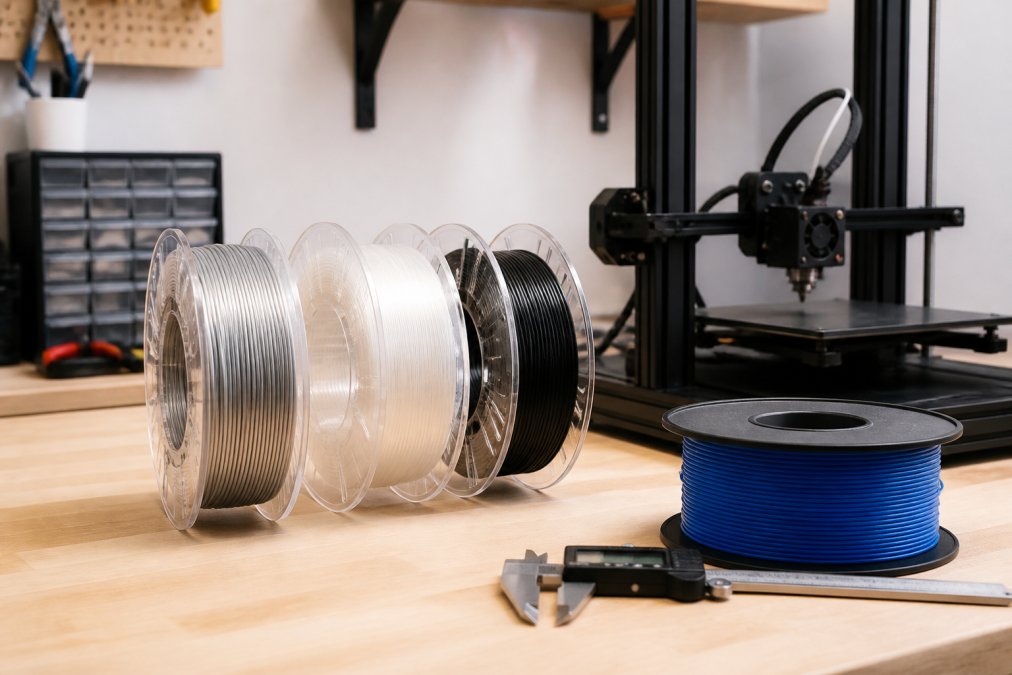
Before you buy, you need to match the filament to your printer’s hardware and your project’s demands. The three most critical factors are the extruder’s maximum nozzle temperature, whether your printer has a heated bed, and if you have an enclosure to control ambient temperature.
Most consumer printers handle lower-temperature materials like PLA and PETG out of the box. High-temperature materials such as ABS and nylon require a hotend capable of sustained 240-260°C output (all3dp.com). Composite filaments containing carbon fiber or metal particles are abrasive, so they demand a hardened steel nozzle to avoid wearing out the standard brass one. Check your printer’s specifications against the material’s required nozzle temperature and bed temperature before purchasing.
How to Choose 3D Printer Filament Types: The Quick Comparison
The fastest way to choose 3D printer filament types is to define your primary use case: decorative models, functional prototypes, flexible parts, or outdoor components. For decorative prints and general hobby use, PLA is the default choice because it prints easily and looks clean. For functional parts that face stress or heat, PETG or ABS offers better durability. For parts exposed to sunlight or high temperatures, ASA resists UV degradation and warping far better than ABS.
Here is a quick reference for the most common materials:
| Filament | Best For | Key Strength | Main Challenge |
|---|---|---|---|
| PLA | Decorative models, prototyping | Easiest to print | Low heat resistance |
| PETG | Functional parts, containers | Strong, durable | Stringing, bed adhesion |
| ABS | Mechanical parts, high heat | Impact resistant | Warping, fumes |
| ASA | Outdoor use, UV exposure | Weather resistant | Warping, fumes |
| TPU | Gaskets, phone cases | Flexible, elastic | Slow printing, jams |
| Nylon | Gears, tools | High tensile strength | Hygroscopic, needs drying |
PLA vs PETG vs ABS Comparison: Which Is Right for You?
The PLA vs PETG vs ABS comparison comes down to a trade-off between printability, strength, and durability. PLA is the easiest to print but brittle and heat-sensitive. PETG offers a middle ground with good strength and easier printing than ABS. ABS provides the best impact and heat resistance but is the most difficult of the three to print reliably without an enclosure.
PLA: The Beginner-Friendly Standard
PLA, or polylactic acid, is the most popular 3D printer filament for good reason. It prints at lower nozzle temperatures, typically around 190-220°C, and does not require a heated bed, though one helps with adhesion. It produces minimal warping and smells faintly sweet rather than acrid.
The trade-off is that PLA has a low glass transition temperature, so parts deform in a hot car or direct sunlight (PubMed). It is also brittle and has low impact resistance. Use PLA for prototypes, display models, and toys that stay indoors. It is the best material to learn with because retraction settings and cooling fan control are far more forgiving than with other filaments.
PETG: Strength and Ease of Use Combined
PETG combines the ease of PLA with greater layer bonding and toughness. It resists moisture, chemicals, and impact better than PLA, making it a strong choice for functional parts like brackets and enclosures. It prints at roughly 230-250°C and needs a heated bed.
The common struggle with PETG is stringing and poor bed adhesion if the first layer is not dialed in. It also absorbs moisture from the air, which leads to bubbles and weak prints if the spool is not dried. Many users find PETG sticks too well to glass beds, so a layer of glue stick or painter’s tape prevents damaging the build surface. For a balance of strength and printability without an enclosure, PETG is the practical sweet spot.
ABS and ASA: For High Heat and Outdoor Use
ABS is the traditional engineering filament, offering high impact resistance and the ability to withstand heat up to about 100°C. It requires a heated bed around 100°C and an enclosure to prevent warping, as drafts cause the layers to cool unevenly and peel from the bed. Printing ABS releases fumes, so you need proper ventilation.
ASA is a direct upgrade over ABS for outdoor applications (prusament.com). It shares the same mechanical properties but has superior UV resistance, so it does not become brittle or fade after months in the sun. Both materials demand patience and a controlled environment. If your part will live outside or near a heat source, ASA is worth the extra setup effort. If you do not have an enclosure, skip both and use PETG instead.
Specialty Filaments: TPU, Nylon, and Composites
When your part needs to bend, flex, or withstand heavy wear, specialty filaments fill the gap. TPU is a flexible filament that prints like rubber, ideal for gaskets, phone cases, and vibration dampeners. It prints slowly to avoid jams, and direct-drive extruders handle it far better than Bowden setups.
Nylon offers exceptional tensile strength and durability for gears and mechanical parts, but it is highly hygroscopic and absorbs moisture from the air within hours of opening. You must dry nylon before and during printing to get consistent results. Composite filaments mix a base plastic with carbon fiber or metal powder to boost stiffness and create a matte finish. They abrade standard nozzles quickly, so a hardened steel nozzle is required. These materials cost more and demand more from your printer, so reserve them for projects that genuinely need their properties.
3D Printer Filament Storage Tips to Prevent Failed Prints
Most filament failures trace back to moisture absorption, not printer settings. Filaments like nylon, PETG, and TPU are hygroscopic, meaning they pull water vapor from the air. When moisture-laden filament passes through the hot nozzle, it turns to steam, causing popping sounds, bubbles, and weak layer adhesion.
Store every spool in an airtight container with desiccant packs. For high-humidity environments, a dedicated filament dryer is worth the investment. A common mistake is leaving spools on the printer between sessions; even overnight exposure degrades quality in humid climates. If a print comes out rough or brittle, dry the spool before changing any other settings. This single habit prevents more failed prints than any profile tweak.
Is 3D Printing Expensive for Beginners? A Cost Breakdown
Is 3D printing expensive for beginners? The answer depends on whether you already own a printer. The printer itself is the largest upfront cost, with reliable entry-level models available across a wide price range. Consumables like 3D printer filament are a smaller, ongoing expense that varies significantly by material type.
Standard PLA spools are the most affordable, while specialty filaments like nylon and composites cost more per kilogram. A common mistake is buying the cheapest filament available, which often has inconsistent diameter and causes jams. Quality filament from a reputable seller costs more but saves money by reducing failed prints. Factor in extras like a spare nozzle and painter’s tape for bed adhesion, and the hobby remains accessible for most budgets.
Common Mistakes to Avoid When Choosing Filament
The most frequent error is buying a filament type your printer cannot physically handle. Check the maximum hotend temperature and whether you have a heated bed before purchasing ABS or nylon. Printing PLA at too high a nozzle temperature causes oozing and poor overhangs, while printing PETG without sufficient cooling leads to stringing.
Another mistake is ignoring the filament diameter. Most consumer printers use 1.75mm filament, but some older or industrial machines use 2.85mm. Buying the wrong diameter wastes money and can damage your extruder. Finally, do not buy multiple exotic filaments at once. Master one material, like PLA or PETG, before moving to finicky options like TPU or nylon. Each new material requires learning its specific retraction settings, print speed, and cooling requirements.
Before your first print with a new filament, run a small temperature tower test. This prints a single model at increasing nozzle temperatures, showing you exactly where stringing stops and layer bonding is strongest for that specific spool.
Conclusion: Start Printing with the Right Material
Selecting the right material is the foundation of a successful print, and it starts with honestly assessing your printer’s hardware and your project’s needs. PLA handles most decorative and hobby projects with the least frustration, while PETG provides the durability for functional parts without demanding an enclosure. Save ABS, ASA, and nylon for specific high-heat or high-stress applications.
At Craft Living Artistry, we curate a focused selection of 3D printer filaments and maker tools. Our thoughtfully chosen inventory supports projects for fun, relaxation, and professional use, with everything you need in one convenient place. Get started with Craft Living Artistry and choose a filament that matches your next project with confidence.
Frequently Asked Questions
Which filament is easiest for beginners to print with?
PLA is the easiest filament for beginners. It prints at lower nozzle temperatures (around 200-220°C), resists warping, and bonds well to common print bed surfaces like glass or painter’s tape. PLA does not require a heated enclosure, making it forgiving for first-time users. Its main limitation is low heat resistance, so keep PLA prints away from hot cars or direct sunlight.
How do I know which filament diameter my printer needs?
Check your printer’s specification sheet or the label near the extruder assembly. Most consumer and hobbyist 3D printers use 1.75mm filament, while some older or industrial models use 2.85mm (sometimes labeled 3.00mm). Using the wrong diameter causes jams and under-extrusion. When in doubt, measure a sample of your current filament with digital calipers for the most accurate reading.
What is the difference between PLA and PLA+?
PLA+ (or PLA Pro) is a modified version of standard PLA with added additives to improve impact resistance and reduce brittleness. It generally prints at slightly higher temperatures and produces parts with better layer bonding and dimensional accuracy. PLA+ is a good middle ground if you want the easy printing of PLA but need parts that withstand minor drops or stress without cracking.
What are the safety differences between PLA and PETG?
Both PLA and PETG are considered relatively safe for indoor printing compared to ABS. PLA emits mostly lactide, which is generally non-toxic in small amounts. PETG, a thermoplastic, requires a slightly higher nozzle temperature and may release more particulates, so good ventilation is recommended. For either material, avoid printing in unventilated small rooms and consider a HEPA filter if you print frequently.




0 Comments