
Table of Contents
- Why PLA Is Ideal for Detailed Models
- Key Characteristics of High-Detail Filament
- Top PLA Filaments for Detailed Models Compared
- Best PLA for Miniatures: Settings and Optimization
- 3D Printing Settings for High Detail
- Is 3D Printing Expensive for Beginners
- Post-Processing Techniques for Fine Detail
- Troubleshooting Common Detail Issues
- Frequently Asked Questions
Last Updated: August 29, 2026
Why PLA Is Ideal for Detailed Models
PLA remains the go-to material for detailed 3D printing because it combines ease of use with precision capabilities that rival more expensive alternatives. Unlike high-temperature materials that demand specialized equipment, PLA delivers crisp edges and fine detail reproduction on standard desktop printers. The material’s low warping tendency and predictable shrinkage keep dimensional accuracy within acceptable tolerances for intricate work.
PLA’s thermal stability during cooling allows delicate elements like micro-text and thin walls under 1mm to set cleanly without distortion. What separates quality results from failures is understanding that PLA’s strength comes from its predictability, a 0.02mm variance in filament diameter becomes critical when printing 0.4mm features, making material selection essential.
Key Characteristics of High-Detail Filament
Premium filaments maintain dimensional accuracy of ±0.02-0.03mm, while budget options often drift to ±0.05mm or worse. That variance compounds across a print, turning sharp edges into rounded approximations.
Thermal stability during cooling is equally important. As PLA cools from nozzle temperature to room temperature, it contracts unevenly in poor-quality materials, creating micro-warping that destroys fine detail through slight bulging on thin walls or distortion on text smaller than 2mm.
Extrusion consistency, how uniformly filament feeds through your nozzle, directly impacts quality. Filament with inconsistent diameter causes over-extrusion (thick lines, lost detail) or under-extrusion (gaps, weak layers). Premium filaments are wound under tension and tested for roundness, while budget materials sometimes show visible ovality under magnification.
Dimensional Accuracy and Tolerance
Dimensional accuracy refers to how closely a printed part matches the digital model’s specifications. For detailed models, accumulated error compounds across complex miniatures with dozens of fine elements. A 0.1mm error on a single feature becomes a 0.3-0.5mm cumulative error overall.
Prusament PLA maintains ±0.02mm diameter tolerance, among the tightest in the industry. Budget filaments often specify ±0.05mm or don’t publish tolerance data at all, forcing constant recalibration for detailed work.
Thermal Stability and Shrinkage
PLA shrinks roughly 0.3-0.8% as it cools, depending on formulation and cooling rate (peer-reviewed research). Premium filaments like eSUN PLA+ and Overture PLA Professional are formulated to shrink uniformly, distributing stress evenly and keeping parts dimensionally stable. Glass transition temperature (Tg) around 60-65°C influences thermal stability, with higher-quality formulations stabilizing the polymer structure during cooling, critical for miniatures stored in variable conditions or handled frequently (peer-reviewed research).
Top PLA Filaments for Detailed Models Compared
Prusament PLA: Precision and Consistency
Prusament PLA is manufactured in-house by Prusa Research using their own quality standards. The filament maintains ±0.02mm diameter tolerance and includes a QR code on each spool linking to detailed production data, batch number, manufacturing date, and material properties specific to that spool. This traceability matters for detailed work, if a print fails, you can reference the exact production batch and adjust settings accordingly.
Prusament PLA excels for jewelry, miniatures, and functional prototypes where dimensional accuracy directly affects usability. At approximately $29.99 per kilogram, it’s among the pricier options, with limited color selection compared to brands offering 50+ shades.
Best for: Users prioritizing precision over cost, professionals running critical prints where failure is expensive, and creators working with complex miniatures requiring tight tolerances.
Pros:
- Exceptional dimensional accuracy (±0.02mm)
- Detailed production data per spool
- Reliable, minimal warping
- Excellent first-layer adhesion
Cons:
- Higher price point
- Limited color palette
- Spools may require AMS modifications on some printers
Polymaker PolyTerra PLA: Matte Finish Excellence
Polymaker PolyTerra PLA solves a specific problem: standard PLA shows visible layer lines requiring post-processing. PolyTerra’s matte finish naturally obscures these lines, giving prints a professional appearance straight off the bed. The bioplastic formulation appeals to environmentally conscious creators, Polymaker plants a tree for each spool sold.
The filament prints cleanly and handles fine detail well, though the matte finish is slightly more abrasive than standard PLA, potentially accelerating nozzle wear. Color options are extensive with 30+ shades, making it ideal for decorative miniatures where aesthetics matter as much as dimensional accuracy.
Best for: Creators prioritizing visual finish, decorative miniatures, and users seeking eco-friendly materials without sacrificing print quality.
Pros:
- Excellent matte finish hides layer lines
- Wide color selection
- Environmentally responsible sourcing
- Comparable strength to standard PLA
Cons:
- Slightly abrasive, requires hardened nozzles for high-volume use
- Marginally higher cost than basic PLA
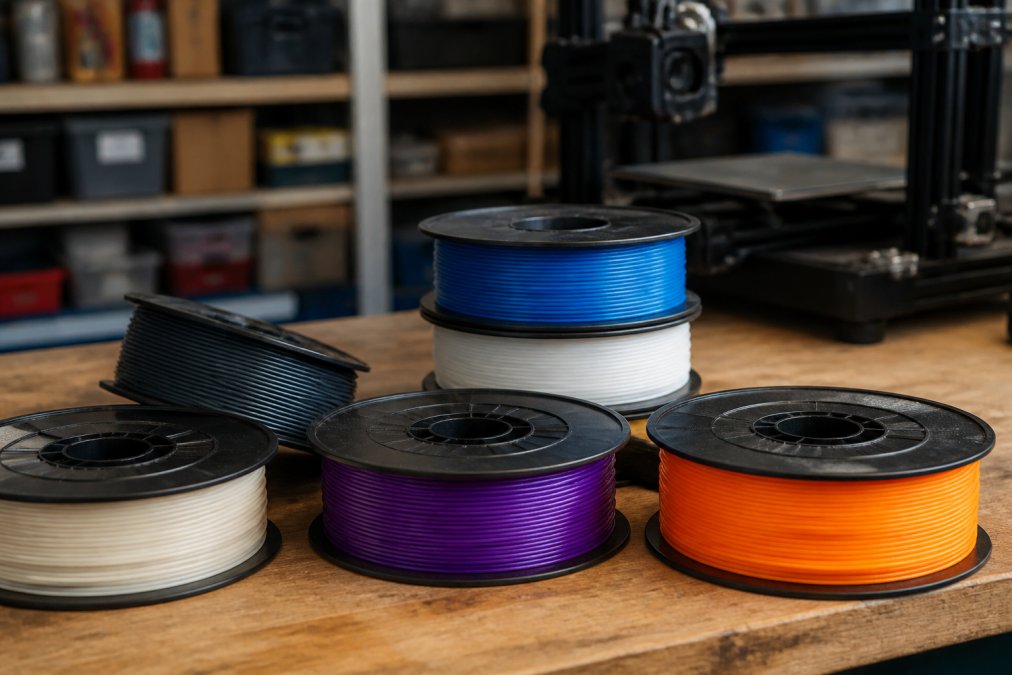
eSUN PLA+: Enhanced Strength for Functional Details
eSUN PLA+ addresses standard PLA’s brittleness by delivering 5-8 times higher impact strength while maintaining print quality comparable to standard PLA (peer-reviewed research). This matters for functional miniatures, game pieces that get handled frequently, or prototypes needing to survive testing.
The filament maintains dimensional accuracy of ±0.03mm with reliable extrusion consistency and better clog resistance than budget alternatives. eSUN designed the formulation for high-speed printing, allowing reduced print times without sacrificing detail quality.
Best for: Functional miniatures, game pieces, mechanical prototypes, and detailed models requiring durability beyond standard PLA.
Pros:
- Significantly tougher than regular PLA
- Good dimensional accuracy
- Handles high-speed printing
- Reliable clog resistance
Cons:
- Requires temperature calibration between batches
- Slightly higher cost than basic PLA
Atomic Filament PLA: US-Made Reliability
Atomic Filament manufactures PLA in Indiana using plant-based corn starch, offering domestically produced material with lower environmental impact than imported alternatives. The filament achieves extremely tight tolerances for both diameter and roundness, rivaling Prusament while maintaining lower cost.
The material ships fresh and dry, important because PLA absorbs moisture from air. Moisture-laden filament produces weak layer bonding and surface defects. Atomic Filament’s vacuum-sealed packaging and fresh-from-factory shipping reduce moisture absorption risk before reaching your printer.
Best for: Users prioritizing US-made products, long print jobs where reliability is critical, and creators seeking consistent quality with lower environmental footprint.
Pros:
- Exceptional precision and roundness
- US-manufactured with lower shipping emissions
- Fresh, dry filament reduces moisture issues
- Excellent layer adhesion and surface finish
Cons:
- Higher price point
- Spools may require AMS modifications
- Limited color selection
Overture PLA Professional: Anti-Clog Formula
Overture PLA Professional combines toughness with reliability through its patented anti-clog formula, reducing nozzle blockage risk, particularly valuable when printing fine details demanding consistent extrusion. Dimensional accuracy sits at ±0.02mm, matching premium competitors.
The filament exhibits excellent first-layer adhesion and low warp tendency, both critical for detailed work. Vacuum-sealed packaging preserves material properties, and the anti-clog design means you can use standard nozzles without fear of jams mid-print.
Best for: Creators experiencing clogging issues, users printing fine detail frequently, and professionals requiring consistent, jam-free performance.
Pros:
- Anti-clog formula prevents jams
- Excellent dimensional accuracy
- Strong layer bonding
- Vacuum-sealed for freshness
Cons:
- Less brand recognition affects availability
- Limited color palette
Best PLA for Miniatures: Settings and Optimization
Printing detailed miniatures requires more than selecting quality filament, your printer settings determine whether that filament’s precision translates to sharp prints. The relationship between nozzle size, layer height, and print speed defines achievable detail.
Nozzle Size and Layer Height Correlation
Nozzle diameter directly limits minimum feature size. A 0.4mm nozzle cannot reliably print features smaller than 0.6-0.8mm. For miniatures with micro-text or thin walls, a 0.2mm or 0.3mm nozzle becomes necessary.
Layer height must scale with nozzle diameter, using 75-85% of nozzle diameter as standard practice. With a 0.4mm nozzle, use 0.3mm layers; with a 0.2mm nozzle, use 0.15mm layers. For detailed miniatures, most creators use a 0.3mm or 0.2mm nozzle with corresponding layer heights of 0.2-0.25mm.
Flow Rate and Extrusion Consistency
Flow rate describes the volume of plastic extruded per unit time. Inconsistent flow produces over-extrusion or under-extrusion. Premium filaments maintain extrusion consistency because their diameter tolerance is tight.
Calibrating flow rate involves printing a test cube and measuring wall thickness. Most filaments require 95-105% flow rate adjustment from slicer defaults. Consistent filament at 98% flow rate will print cleanly, while filament varying ±3% in diameter produces visible quality variation across a print.
3D Printing Settings for High Detail
Print Speed and Cooling Fan Speed
Print speed for detailed work typically ranges from 30-50mm/s, compared to 50-80mm/s for general-purpose printing. Slower speeds give the extruder time to deposit plastic precisely and allow the cooling fan to solidify each layer before the next deposits.
Cooling fan speed is equally critical. For miniatures, run the fan at 80-100% from the first layer onward. Rapid cooling solidifies fine features before gravity or subsequent layers distort them. Start with 40mm/s print speed and 90% fan speed, then adjust based on results.
Slicer Profile Optimization
For detailed miniatures, several slicer settings directly impact quality:
Retraction distance and speed control stringing. Use 5-7mm retraction distance at 40-50mm/s for bowden extruders, or 2-3mm at 30-40mm/s for direct drive extruders.
Wall line width should match your nozzle diameter or be slightly narrower (0.35mm for a 0.4mm nozzle). Infill percentage can stay at 10-15% for miniatures. Support density of 2-3mm line spacing balances ease of removal with adequate support.
Is 3D Printing Expensive for Beginners
Entry cost for quality 3D printing has dropped significantly. A capable printer starts around $200-400, filament costs roughly $15-30 per kilogram, and maintenance supplies are minimal. For occasional miniature printing, material costs might run $10-20 per month.
The real cost question is failed prints. Beginners’ first attempts often fail due to incorrect settings, wasting filament and time. Selecting quality filament reduces failure rates because consistent material is more forgiving of imperfect settings. Quality filament, while slightly more expensive upfront, actually saves money by reducing failures.
Post-Processing Techniques for Fine Detail
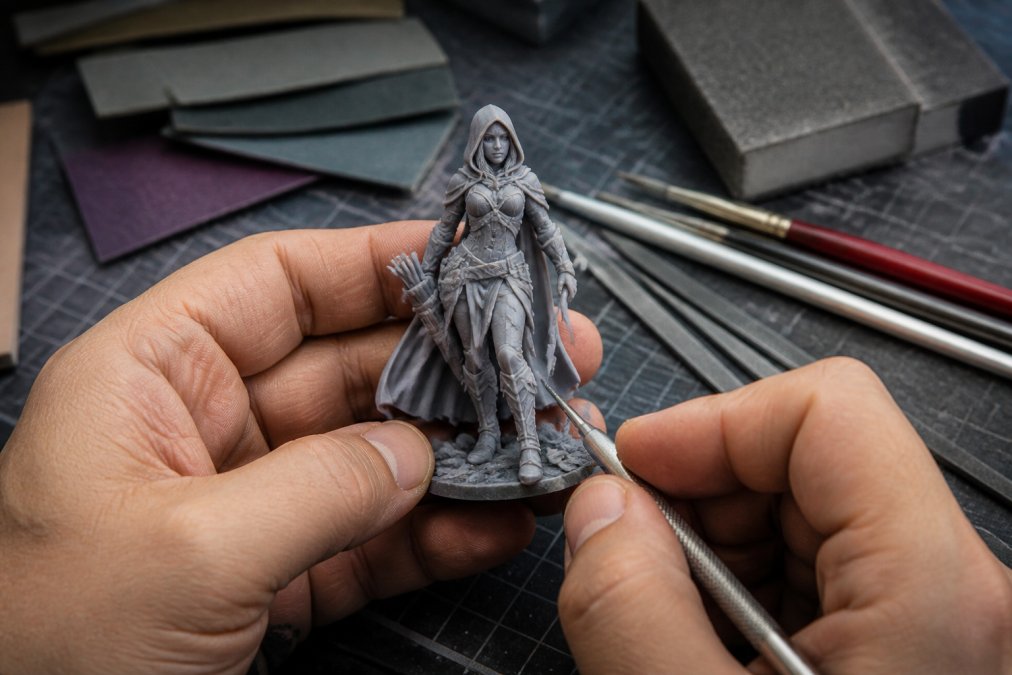
Raw prints rarely look finished. Post-processing combines sanding, smoothing, and painting to enhance detail and create professional results.
Sanding removes layer lines and surface irregularities. Start with 120-grit sandpaper for aggressive smoothing, then progress to 400-600 grit for fine finishing. For miniatures, focus on large flat surfaces, detailed features shouldn’t be sanded heavily because you’ll round off preserved detail.
Painting brings miniatures to life. Prime with thin spray paint or brush-applied primer, then use acrylics for detail work. Thin coats prevent paint from filling fine details. Dry brushing, applying nearly-dry paint to raised surfaces, highlights detail naturally.
Troubleshooting Common Detail Issues
Stringing and Retraction Problems
Stringing appears as thin plastic threads between separate features. It results from nozzle oozing while moving between print locations. Detailed miniatures with many small features are particularly prone to stringing.
Increase retraction distance by 0.5mm increments until stringing disappears, but excessive retraction causes grinding and filament damage. Most materials reach optimal performance at 5-7mm retraction. If stringing persists, reduce print speed or increase nozzle temperature slightly.
Warping and Adhesion Challenges
Warping occurs when PLA cools unevenly, creating internal stress that pulls the print away from the bed. Ensure your bed is level and clean, dust and residue reduce adhesion. Heated beds (50-60°C for PLA) improve adhesion by keeping the base layer soft enough to bond fully. Print orientation matters: tall, narrow orientations reduce warping risk compared to wide, flat orientations.
Bridging and Overhang Failures
Bridging refers to printing horizontal sections with no support beneath them. Both bridging and overhangs challenge PLA because the material needs rapid cooling to prevent sagging.
Bridging over short distances (up to 10mm) succeeds with standard settings if cooling is adequate. Longer bridges require support structures. For miniatures, use support density of 2-3mm line spacing. Anything steeper than 45 degrees from vertical typically requires support.
Selecting the best PLA filament for detailed models comes down to understanding what precision means for your specific project. Premium filaments like Prusament and Atomic Filament justify their cost through dimensional consistency that reduces failed prints and eliminates constant recalibration. Polymaker PolyTerra excels for decorative miniatures where finish matters as much as accuracy. eSUN PLA+ and Overture PLA Professional bridge the gap between cost and reliability for functional detailed work.
The filament you choose matters, but settings matter equally. A 0.2mm nozzle with 0.2mm layers, 40mm/s print speed, and 90% cooling fan speed will extract maximum detail from any quality filament. Budget materials often fail not because the filament is inherently bad, but because their inconsistency forces constant adjustments that beginners lack experience to diagnose.
At Craft Living Artistry, we curate filament selections specifically for detailed work, eliminating the guesswork of choosing from hundreds of options. Whether you’re printing your first miniature or scaling production, the right filament paired with optimized settings transforms detailed models from aspirational to achievable.
Frequently Asked Questions
What is the highest quality PLA filament for fine details?
Prusament PLA and Atomic Filament PLA offer the tightest dimensional tolerances (±0.02 mm), which directly reduces layer inconsistency and improves surface finish. For miniatures specifically, the combination of precise diameter tolerance, consistent extrusion, and excellent bed adhesion makes these brands ideal. PolyTerra PLA adds a matte finish that hides layer lines, enhancing the appearance of intricate details without additional post-processing.
How does nozzle size affect detail in 3D printing with best PLA for miniatures?
Smaller nozzles (0.4 mm or less) create finer lines and sharper edges, essential for micro-text and intricate features. A 0.2 mm nozzle paired with 0.1 mm layer heights produces crisp details but requires slower print speeds and higher precision filament. For miniatures, the correlation is direct: tighter nozzle diameter and lower layer height preserve dimensional accuracy and prevent feature blur, but demand filament with excellent extrusion consistency to avoid clogging.
What print settings improve detail for PLA models?
Use a print speed of 30-40 mm/s for detail work, increase cooling fan speed to 80-100% after the first few layers, and set layer height to 0.1 mm or lower. Enable retraction with 5-7 mm distance and 40 mm/s speed to minimize stringing. Fine-tune flow rate to 95-100% to avoid over-extrusion that blurs edges. Most slicer profiles for high-detail PLA include these settings pre-configured; test on scrap material first to verify your specific printer’s calibration.
Is 3D printing expensive for beginners interested in detailed models?
Initial filament costs are modest: quality PLA for detail work ranges from $15 to $30 per kilogram spool, with each spool producing dozens of miniatures depending on size. A single 1 kg spool can yield 50+ small models. The main expense for beginners is the printer itself ($200-$500 entry-level), not the materials. Once you own a printer, per-model material cost is typically $0.50 to $3.00, making it affordable for hobbyists and experimental projects.
This article was written using GrandRanker



0 Comments