
Last Updated: October 29, 2026
Quick Summary
To paint 3D printed miniatures, prep the print by washing and curing resin parts or removing dust and supports from filament parts, then prime it for paint adhesion. Apply thin acrylic base coats, add shading and highlights, and finish with a protective sealer.
- Resin prints need a two-stage alcohol wash, full drying, and UV curing before painting.
- Filament prints need dust brushed off, strings snipped, and supports cut at the contact point.
- Shake spray primer for one to two minutes and spray in short passes from 6 to 12 inches away.
- Spray primer in temperatures around 50 to 90°F, since cold or damp air causes a chalky finish.
- Apply thin paint coats and let each dry before adding the next to keep details visible.
Table of Contents
- What You Need Before You Start Painting
- Preparing the Print: Cleaning Dust and Support Marks
- How to Remove Layer Lines From 3D Prints Before Painting
- How to Prime 3D Printed Miniatures for Paint Adhesion
- Best Paint for 3D Printed Miniatures and How to Apply It
- Painting Details, Troubleshooting Common Failures and Sealing
- Start Your First Miniature Project With the Right Kit
- Frequently Asked Questions
What You Need Before You Start Painting
Learning to paint 3D printed miniatures is one of the most rewarding ways to bring a tabletop figure or display piece to life.
Here is a simple way to think about the work. Prep the print, prime it, paint it in layers, then protect the finish. Each stage builds on the one before, so skipping a step usually shows up in the final result.
Choosing Brushes and Paints for Beginners
You do not need a large kit to start. A small set of supplies covers most beginner projects:
- A medium brush for base coats and larger areas
- A fine-detail brush for eyes, buckles, and small trim
- Acrylic paints in a few basic colors, plus black and white
- A spray primer or a brush-on primer for even coverage
- A cup of water and a paper towel for cleaning brushes
Acrylic paint is a common choice for painting 3D printed miniatures because it is water-based, dries fast, and cleans up with soap and water. Many beginners start with a handful of pots rather than a full range, then add colors as their projects grow.
Preparing the Print: Cleaning Dust and Support Marks
Preparation is where resin prints and filament prints split into two different workflows. The steps below assume you know which type you are holding; if not, check the box, spool label, or slicer file before you start.
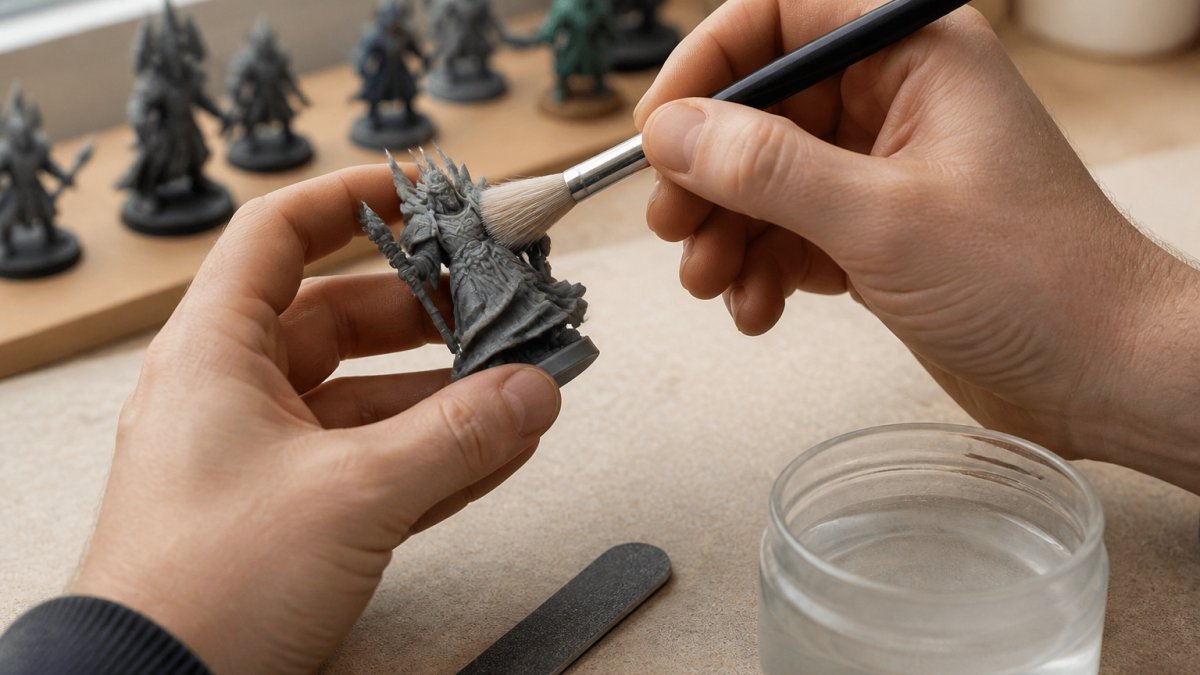
Resin prints: wash, cure, then handle
Resin prints come off the build plate coated in uncured resin, which is a skin and eye irritant. Put on nitrile gloves before you touch the part, and work over a disposable mat in a ventilated room. This sequence is commonly followed:
- Drain and detach. Let the print drip back into the vat, then remove it with a scraper. Keep supports attached for now; they give you something to hold.
- Wash. Rinse in two stages, a dirty wash to remove the bulk of the resin, then a clean wash in fresh isopropyl alcohol (90% or higher is common) for one to three minutes. Agitate gently; do not scrub, which can bend thin parts.
- Dry completely. Let the part air-dry until no alcohol remains in recesses. Trapped solvent can cause cloudy patches or weak cure.
- Cure. Expose the print to UV light, a dedicated curing station or bright sunlight, until the surface is no longer tacky. Over-curing makes the resin brittle, so check every few minutes rather than leaving it for an hour.
- Remove supports. Use flush cutters and a hobby knife. Cut slightly proud of the surface, then sand flush.
Uncured resin and resin-contaminated alcohol are hazardous waste in most jurisdictions. Do not pour them down a drain. Check your local household hazardous waste rules before disposal.
Filament (FDM) prints: dust, strings, and support scars
FDM prints arrive dry but dusty, with stringing, blobs, and support contact marks. The workflow is simpler but still order-dependent:
- Brush off loose dust with a soft brush or a clean, dry paintbrush. Do this outside or over a trash bin.
- Snip strings and blobs with flush cutters. Pulling them can tear the surface.
- Remove supports with flush cutters and needle-nose pliers. Cut at the contact point, not at the base, to avoid levering chunks out of the model.
- Sand contact marks with a fine sanding stick or sponge (400-800 grit is a common starting range). Work in one direction and check often.
Sanding dust and ventilation
Sanding any print, resin or filament, releases fine particulate. Wear an N95 or better respirator, work in a ventilated space, and wipe the model with a damp cloth afterward so dust does not get trapped under primer. Resin dust is the bigger concern because the cured material can still contain unreacted resin; keep it out of the air and off your skin.
A quick pre-paint checklist
- Supports removed and contact points sanded flush
- Surface wiped free of dust and dry to the touch
- Resin prints fully cured, not tacky
- No loose strings, blobs, or trapped liquid in recesses
A clean, fully cured, dust-free surface is what makes primer and paint adhere. Skipping the wash or the cure on a resin print is the most common reason paint later peels or looks cloudy.
The table below summarises the key preparation steps for resin and filament prints, so you can check the right sequence for your print type.
| Print type | Step | Key detail |
|---|---|---|
| Resin | Wash | Two stages; 90% or higher isopropyl alcohol |
| Resin | Dry | Dry completely before curing |
| Resin | Cure | Check every few minutes; over-curing makes it brittle |
| Resin | Remove supports | Cut proud, then sand flush |
| Filament | Brush off dust | Do it outside or over a bin |
| Filament | Snip strings | Use flush cutters, don’t pull |
| Filament | Remove supports | Cut at the contact point |
| Filament | Sand contact marks | 400-800 grit as a starting range |
How to Remove Layer Lines From 3D Prints Before Painting
Layer lines are the faint ridges that come from how the printer builds the model one layer at a time. On large, flat surfaces they can show through paint, so many painters sand them before priming.
Use a fine sanding stick or a soft sanding sponge in light, even strokes. Work in one direction and check the surface often. Stop once the ridges fade, since over-sanding can round off fine details.
Here is a simple process to follow:
- Sand lightly with a fine grit to smooth raised ridges
- Wipe the model with a damp cloth to remove sanding dust
- Inspect the surface under good light before moving on
How to Prime 3D Printed Miniatures for Paint Adhesion
Primer is the bridge between the print and the paint. A thin, even coat gives acrylic something to grip; a heavy coat fills detail and can leave a fuzzy or grainy surface that no amount of paint will hide.
Spray primer: the default for most beginners
A rattle-can primer is the fastest route to even coverage. A few practical rules keep it reliable:
- Shake longer than you think. Most cans need one to two minutes of shaking after the mixing ball starts rattling.
- Mind the weather. Spray when humidity is moderate and the temperature is comfortable, roughly 50-90°F. Cold or damp air causes a chalky, powdery finish.
- Spray in short passes. Hold the can 6-12 inches away and sweep across the model in light bursts, starting and ending the spray off the model. Do not hold the nozzle still.
- Rotate, don’t flood. Turn the model between passes so recesses and undersides get coverage without pooling.
- Let it flash off. Most spray primers are touch-dry in 15-30 minutes and ready for paint after a few hours; check the can for the recoat window and stay within it, or wait until fully cured.
Brush-on primer: better control, slower coverage
Brush-on primer suits small parts, repairs, and indoor work where spraying is not practical. Apply it in thin coats with a flat brush, let each coat dry, and build coverage gradually. It takes longer but lets you avoid clogging fine detail.
Checking coverage
Hold the primed model under a bright light and look for shiny spots, those are bare plastic or resin. A second light pass over shiny areas is usually enough. If the surface looks fuzzy or gritty, the primer went on too dry or in too humid air; let it cure fully, then lightly sand with a fine grit and re-prime.
Common primer problems and fixes
- Pooling in recesses: You sprayed too close or held the nozzle still. Wipe the wet pool with a corner of paper towel, let it dry, and re-prime lightly.
- Fuzzy or grainy finish: Humidity, cold, or spraying from too far away. Sand lightly once cured and re-prime in better conditions.
- Clogged detail: Too many coats. Strip with isopropyl alcohol (test on a hidden area first) or accept the softened detail and adjust your technique next time.
- Primer peeling: The surface was dusty or oily. Clean, dry, and re-prime.
Prime a test piece, a support raft or a scrap print, before committing a full miniature. It tells you how the can behaves in today’s weather in about two minutes.
Once the primer is dry and coverage is even, you are ready for the base coat. If you spot a flaw at this stage, fix it now: sanding and re-priming a small patch is far easier than repairing paint later.
Best Paint for 3D Printed Miniatures and How to Apply It
Acrylic paints remain the most common choice for beginners because they are easy to work with and forgiving of mistakes.
Apply thin coats rather than one heavy layer. Thin coats build color evenly and keep details visible. Let each coat dry before adding the next one.
Once the base colors are in place, you can add shading and highlights. A wash, which is a thinned paint that settles into recesses, adds depth.
Painting Details, Troubleshooting Common Failures and Sealing
Fine details take patience. Use your smallest brush, keep your hand steady, and paint in short strokes. If a line goes wrong, let the paint dry and touch it up with the base color.
Common problems have simple fixes:
- Streaky color: Add another thin coat instead of thickening the paint
- Paint peeling: Check that the surface was cleaned and primed properly
- Muddy shading: Use a thinner wash and let it settle longer
- Rough texture: Sand gently, then prime again before repainting
Once the model is finished, seal it. A clear protective coat guards the paint against chips, handling, and dust. Choose a finish that suits the look you want, whether matte, satin, or gloss, and let the sealer dry fully before handling the piece.
Start Your First Miniature Project With the Right Kit
The best way to learn is to start a small project and finish it. A starter kit that includes a few brushes, basic acrylic colors, and a primer can help you move from planning to painting without guesswork.
Pick one simple miniature, follow the steps above, and you will likely be surprised by how much you learn on the first project. Each model gets easier with practice.
Frequently Asked Questions
How do you prepare a 3D printed miniature for painting?
Start by removing support marks with a hobby knife or flush cutter, then wash the print in warm water with a drop of dish soap to clear dust and residue from printing or curing. Let it dry fully. Lightly sand layer lines and rough spots with fine sandpaper, then wipe away the dust. A clean, slightly scuffed surface gives primer and paint something to grip, which prevents chipping later on.
Do you need to prime a 3D printed miniature before painting?
Yes, priming is strongly recommended. A primer coat fills small surface imperfections, shows where layer lines and sanding marks remain, and gives acrylic paint a uniform base to adhere to. Most hobbyists use a spray primer in a neutral grey, white or black, applied in thin, even coats. Let it cure completely before adding base colors.
What kind of paint works best on 3D printed miniatures?
Water-based acrylic paints designed for miniatures work well on both resin and FDM prints once the surface has been primed. Thin, multiple coats usually give better coverage than one thick layer. Choose a paint line with good pigment density for base coats and use contrast or shading paints for detail work. Test a small area first if you are unsure how a particular paint adheres to your print material.
Can you paint a resin 3D printed miniature?
You can, but resin prints need thorough cleaning first. Wash the model in isopropyl alcohol to remove uncured resin, then cure it fully under UV light. Wear nitrile gloves and work in a ventilated area during this process. After curing, follow the same sanding, priming and painting steps used for other prints, since resin surfaces are often smoother and may need a light scuff before primer.





0 Comments