
Table of Contents
- Why Elementary Students Need Screen Time Alternatives
- Quick Comparison: Top Screen-Free Activities and Tools
- The Benefits of Hands-On Play for Child Development
- Creative DIY Craft Kits for Kids: A Parent’s Best Tool
- How to Set Screen Time Limits for Elementary Schoolers
- Age-Specific Activities for Elementary Students
- Transition Strategies: Moving from Screen to Hands-On Play
- Conclusion: Building a Balanced Routine
- Frequently Asked Questions
Last Updated: September 24, 2026
Why Elementary Students Need Screen Time Alternatives
The average elementary student now spends more waking hours in front of a screen than in active play, and pediatric recommendations continue to emphasize the value of unstructured, screen-free time. This guide breaks down the best alternatives to screen time for elementary students, organized by developmental stage and budget.
Quick Comparison: Top Screen-Free Activities and Tools
The best alternatives to screen time for elementary students fall into a few proven categories: building toys, audio players, and guided craft kits. Here’s how the top options compare.
| Activity / Tool | Best For | Starting Price | Screen-Free? |
|---|---|---|---|
| Craft Living Artistry kits | Guided creative projects | Varies by kit | Yes |
| LEGO Duplo | Hands-on construction | $19.99 | Yes |
| Magna-Tiles | Spatial reasoning | $29.99 | Yes |
| Toniebox | Independent listening | $99.99 | Yes |
| Pinwheel Crafts Kits | Fine motor development | $15.00 | Yes |
Pair a building toy with a craft kit so kids rotate between two activity types instead of finishing one and asking for a tablet. Rotation keeps novelty high without adding screens.
The Benefits of Hands-On Play for Child Development
Hands-on play is the single most reliable driver of fine motor skills, problem-solving skills, and executive function in elementary-age children. A common mistake is treating play as a break from learning. In practice, it is the learning.
What Hands-On Play Actually Builds, Skill by Skill
Generic lists say “fine motor skills.” Here is what that means in practice, and which activities build which skill:
- Pincer grasp and hand strength: threading beads onto cord, pinching clay, winding yarn. These are the same muscle patterns used for holding a pencil and forming letters.
- Bilateral coordination: cutting with scissors, kneading dough, lacing. Both hands must do different jobs at once, a skill that shows up later in typing and playing an instrument.
- Visual-spatial reasoning: Magna-Tiles, LEGO, and block building. Children mentally rotate and fit pieces before their hands move, which is the same reasoning used in geometry and map reading.
- Executive function: planning a multi-step craft, following instructions in order, and correcting a mistake without abandoning the project. This is the “air traffic control” of the brain, and it develops through repetition, not instruction.
- Social-emotional learning: sharing a bin of beads, taking turns with a single glue stick, and negotiating who gets the blue pieces. These small frictions are where cooperation is actually learned.
Why the Mechanism Matters More Than the Activity
The real difference between a bored kid and an engaged one usually comes down to whether their hands are busy and whether the task is just hard enough. A project that is too easy produces boredom; one that is too hard produces frustration. The sweet spot, sometimes called the “just-right challenge,” is where a child can almost do it alone but needs one small assist.
If your child abandons projects halfway, the task is probably too hard. If they finish in two minutes and wander off, it is too easy. Adjust the material, not the child.
The Screen-Time Trade-Off
Screen time is not neutral. Every hour of passive viewing is an hour not spent on the hand-brain feedback loop that builds these skills. That does not mean screens are harmful in themselves; it means the opportunity cost is real. Replacing even one daily hour of passive screen time with hands-on play gives a child roughly 365 extra hours a year of skill-building repetition.
Creative DIY Craft Kits for Kids: A Parent’s Best Tool
Creative DIY craft kits for kids solve the hardest part of screen-free time: setup. A good kit arrives with every piece included, so there’s no scramble for glue or missing beads while a child loses interest.
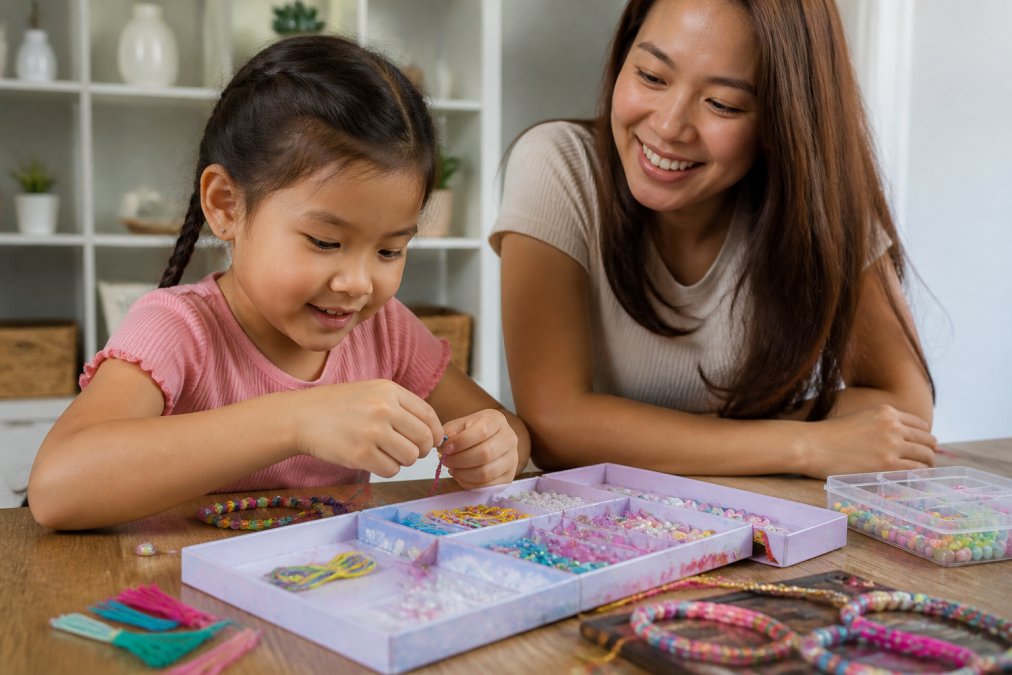
Buying a kit without checking the contents list is the fastest way to waste money. If the listing doesn’t say exactly what’s inside, expect to buy missing supplies separately, which defeats the purpose of a kit.
How to Set Screen Time Limits for Elementary Schoolers
Learning how to set screen time limits for elementary schoolers works best when the limits are automatic and predictable rather than negotiated daily. Tools do the enforcing so parents don’t have to be the bad guy every afternoon.
| Tool | Platform | Starting Price | Best For |
|---|---|---|---|
| Apple Screen Time | iOS | Free | iOS households |
| Google Family Link | Android | Free | Android households |
| Bark Jr | Cross-platform | $5.00/month | Scheduling and filtering |
| Qustodio | Cross-platform | $54.95/year | Multiple device types |
Age-Specific Activities for Elementary Students
Most screen-time alternative lists treat elementary students as one group. They are not. A six-year-old and a ten-year-old need very different challenges, and matching the activity to the developmental stage is what keeps kids engaged instead of frustrated. This section organizes alternatives by age band, with the milestone each activity supports and a budget note so you can choose between free household play and a purchased kit.
Ages 6-7: Building the Foundation
At this stage, children are developing hand strength, short-task persistence, and the ability to follow two- or three-step directions. Projects should be short, tactile, and completable in one sitting.
- Milestone focus: pincer grasp, sequencing, turn-taking
- Free options: play dough from flour and salt, cardboard box forts, nature walks with a collection jar, kitchen-measuring “cooking”
- Low-cost kits: large-brick building sets, simple beading with thick cord, sticker-by-number books
- What to avoid: multi-day projects, tiny pieces that frustrate small hands, anything requiring reading instructions alone
Ages 8-9: Stretching Attention and Planning
Kids this age can hold a plan in mind across multiple steps and start to care about the quality of the finished product. This is the window where guided craft kits and strategy games pay off most.
- Milestone focus: multi-step planning, rule-following, frustration tolerance
- Free options: board games and puzzles, fort building, backyard obstacle courses, comic-strip drawing
- Low-cost kits: Magna-Tiles structures, beginner sewing or jewelry making, model kits with clear instructions
- What to avoid: activities with no visible progress, open-ended tasks with no suggested starting point
Ages 10-11: Ownership and Hobby Development
Older elementary students want to own the outcome. They are ready for independent projects, real tools, and hobbies they can return to over weeks rather than afternoons.
- Milestone focus: independent planning, delayed gratification, identity-building through interests
- Free options: cooking a full recipe, woodworking with supervision, gardening, journaling, sports drills
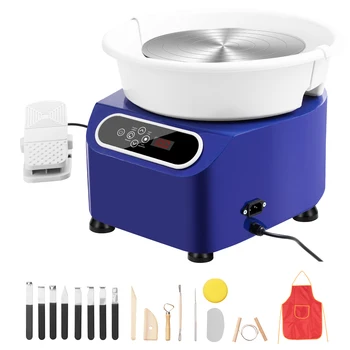
- Investment options: pottery tools, advanced model building, instrument practice, robotics kits without screens
- What to avoid: activities that feel like “little kid” play, over-scheduled group projects with no personal stake
Budget Tiers at a Glance
- Free: household materials, backyard play, library programs, board games you already own
- Under $25: beading supplies, play dough, basic building sets, puzzle books
- $25-$75: Magna-Tiles, guided craft kits, mid-range model kits
- $75+: audio players, pottery tools, larger building systems, instruments
Neurodivergent-Friendly Adjustments
For children with ADHD or sensory processing needs, the same activities work but the delivery changes:
- Shorten the project into smaller wins with a visible finish line at each step
- Reduce sensory triggers such as strong smells, loud group settings, or sticky textures
- Build in movement breaks between steps rather than expecting a child to sit through a full project
- Offer a choice between two options, not an open menu, to reduce decision fatigue
- Use visual timers and a posted routine so transitions are predictable rather than sudden
Transition Strategies: Moving from Screen to Hands-On Play
The transition is where most families fail, and it has nothing to do with the activities themselves. Kids don’t resist screen-free time; they resist abrupt endings.
The most effective transition strategy is a predictable routine, not a stricter rule. Same time, same sequence, every day.
A few moves that work in practice:
- Announce the transition five minutes before it happens
- Have the activity already set up before screen time ends
- Let the child pick between two options, not zero
- Keep the first screen-free block short, then extend it
Conclusion: Building a Balanced Routine
Screen-free time works when it’s structured, not when it’s forced. The best alternatives to screen time for elementary students are the ones your child will actually return to: building toys, audio players, and guided craft projects that fit your budget and their stage.
Frequently Asked Questions
What should kids do instead of screen time?
Elementary students can replace screen time with hands-on activities that support cognitive development and fine motor skills. Options include building with LEGO Duplo or Magna-Tiles, listening to audio stories on a Toniebox, or working on creative DIY craft kits for kids. These screen-free alternatives encourage imaginative play, problem-solving skills, and independent play while keeping children actively engaged.
How do I encourage my child to play without screens?
Start by creating a screen-free environment during designated times, like after school or before dinner. Offer a choice between two or three hands-on activities, such as a craft kit or building blocks, to give them a sense of control. Join them for the first few minutes to spark interest, then step back. Using transition strategies like a visual timer or a ‘boredom jar’ of activity ideas can also reduce resistance and help build a new routine.
What are the benefits of reducing screen time for elementary students?
Reducing screen time supports attention span, behavioral regulation, and social-emotional learning. When children trade screens for tactile activities like crafting or outdoor exploration, they build executive function through active engagement. The benefits of hands-on play for child development also include improved fine motor skills and creative expression, plus more opportunities for family bonding and unstructured play.
How can I set screen time limits without constant arguments?
Use built-in tools like Apple Screen Time or Google Family Link to automate limits and schedule downtime. This removes you from the role of enforcer. Pair tech limits with clear alternatives: ‘When the timer goes off, you can choose the craft kit or the Magna-Tiles.’ Consistency matters more than perfection. Expect a transition period as your child adjusts to a new routine.
Are craft kits worth the investment compared to free activities?
Both have value. Free activities like outdoor exploration and reading are essential, but creative DIY craft kits for kids offer unique advantages: they include all necessary materials, reduce parental prep time, and provide step-by-step guides that build confidence. For parents short on time or unsure where to start, a curated kit can be a practical investment. Look for kits with high-quality materials and clear instructions to ensure a positive experience.





0 Comments